AADGraphActivityLogs in Microsoft Sentinel
AADGraphActivityLogs should now finally populate data after having been first spotted in the wild over a year ago.
The table covers legacy Azure AD Graph traffic to https://graph.windows.net, which is useful if you are still cleaning up old tools, old apps, or old habits.
If you’re wondering if MicrosoftGraphActivityLogs doesn’t already cover this, that table gives us visibility into graph.microsoft.com. AADGraphActivityLogs is the missing “link” for the legacy side.
Quick info
| Item | Value |
|---|---|
| Table reference | AADGraphActivityLogs |
| Sample queries | Queries for the AADGraphActivityLogs table |
| Resource type | microsoft.azureadgraph/tenants |
| Categories | Audit, Security |
| Solution | LogManagement |
Sample data
In order to generate some data for myself, I landed on two tools to help me generate some noise:
AADInternalsROADTools
I’m running some simple enumeration queries with both tools.
Generating sample data with AADInternals
For AADInternals, I wanted requests that were obviously AADInternals in the log, so I used the module’s Graph helpers instead of plain Invoke-RestMethod.
Install-Module AADInternals -Scope CurrentUser
Import-Module AADInternals

$modulePath = (Get-InstalledModule -Name AADInternals).InstalledLocation
. (Join-Path $modulePath 'AccessToken.ps1')
. (Join-Path $modulePath 'GraphAPI_utils.ps1')
. (Join-Path $modulePath 'GraphAPI.ps1')

$token = az account get-access-token --resource https://graph.windows.net --query accessToken -o tsv

Get-TenantDetails -AccessToken $token
Get-AADUsers -AccessToken $token | Select-Object -First 10
Get-Devices -AccessToken $token | Select-Object -First 10
Generating sample data with with ROADtools
ROADtools will hopefully produce help us produce a bit of dB noise.
python -m pip install roadrecon

$graphToken = az account get-access-token --resource https://graph.windows.net --query accessToken -o tsv

python -m roadtools.roadrecon.main auth --access-token $graphToken -f roadrecon-auth.json
python -m roadtools.roadrecon.main gather -f roadrecon-auth.json -d roadrecon.db -t <tenant-id>
Detection queries
These queries are aimed at simply detecting the sample data I generated above, so they shouldn’t be copied as-is for use as detection, as they might not generate a lot of real alerts since they rely on tool-default user agents.
Detect AADInternals
AADGraphActivityLogs
| where UserAgent == "AADInternals"
| extend TopLevelResource = tostring(split(split(RequestUri, "?")[0], "/")[3])
| project TimeGenerated, RequestMethod, RequestUri, TopLevelResource, AppId, UserId, CallerIpAddress, UserAgent, SessionId, SignInActivityId, ResponseStatusCode
| sort by TimeGenerated desc
Example output, anonymized:

Detect ROADrecon
AADGraphActivityLogs
| extend TopLevelResource = tostring(split(split(RequestUri, "?")[0], "/")[3])
| summarize Requests = count(), DistinctResources = dcount(TopLevelResource), ResourceSet = make_set(TopLevelResource, 20), FirstSeen = min(TimeGenerated), LastSeen = max(TimeGenerated) by AppId, UserId, CallerIpAddress, UserAgent, ActorType, SessionId, SignInActivityId
| where UserAgent has "aiohttp" or (Requests >= 500 and DistinctResources >= 10)
| sort by Requests desc
Example output, anonymized:
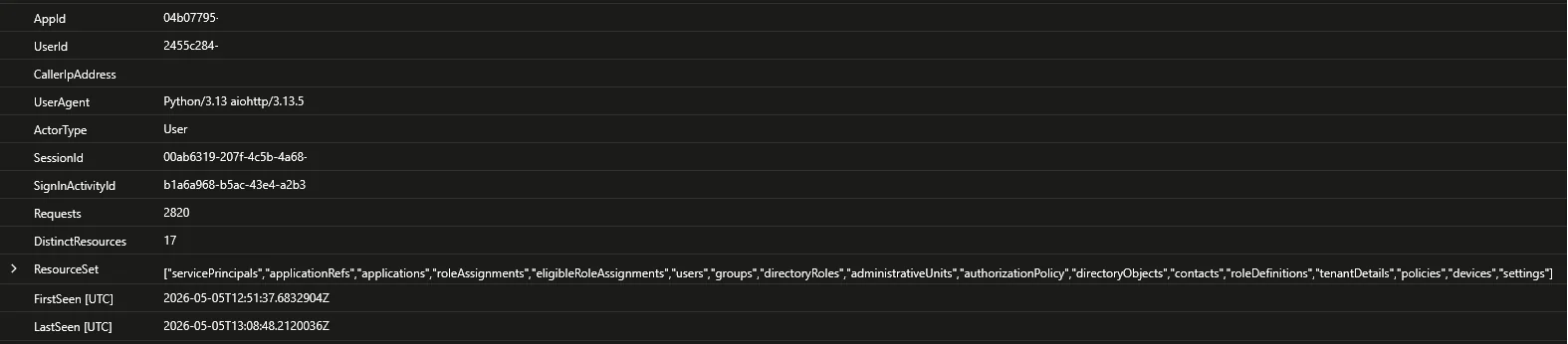
I took some inspiration from a recent post by Invictus IR. The detection uses either the default aiohttp user agent, or a short-window endpoint list if the operator spoofs the user agent. I kept the query here a bit broader by using resource breadth instead of a fixed list.
Correlate tool traffic with SigninLogs
let ToolTraffic =
    AADGraphActivityLogs
    | where UserAgent in ("AADInternals", "Python/3.13 aiohttp/3.13.5")
    | extend JoinSignInActivityId = trim_end(@"=", SignInActivityId)
    | project AadGraphTime = TimeGenerated, RequestUri, AppId, UserId, CallerIpAddress, UserAgent, ActorType, SessionId, SignInActivityId, JoinSignInActivityId, ResponseStatusCode;
ToolTraffic
| join kind=leftouter (
    union isfuzzy=true
        (SigninLogs
        | project SigninTime = TimeGenerated, UserPrincipalName, AppDisplayName, IPAddress, SessionId, JoinSignInActivityId = UniqueTokenIdentifier, ConditionalAccessStatus, ResultType, ResultDescription, SigninSource = "SigninLogs"),
        (AADNonInteractiveUserSignInLogs
        | project SigninTime = TimeGenerated, UserPrincipalName, AppDisplayName, IPAddress, SessionId, JoinSignInActivityId = Id, ConditionalAccessStatus, ResultType, ResultDescription, SigninSource = "AADNonInteractiveUserSignInLogs")
) on JoinSignInActivityId
| project AadGraphTime, SigninTime, RequestUri, AppId, UserId, CallerIpAddress, UserAgent, ActorType, AadGraphSessionId = SessionId, SignInActivityId, UserPrincipalName, AppDisplayName, SigninIp = IPAddress, ConditionalAccessStatus, ResultType, ResultDescription, SigninSource
| sort by AadGraphTime desc
Example output:
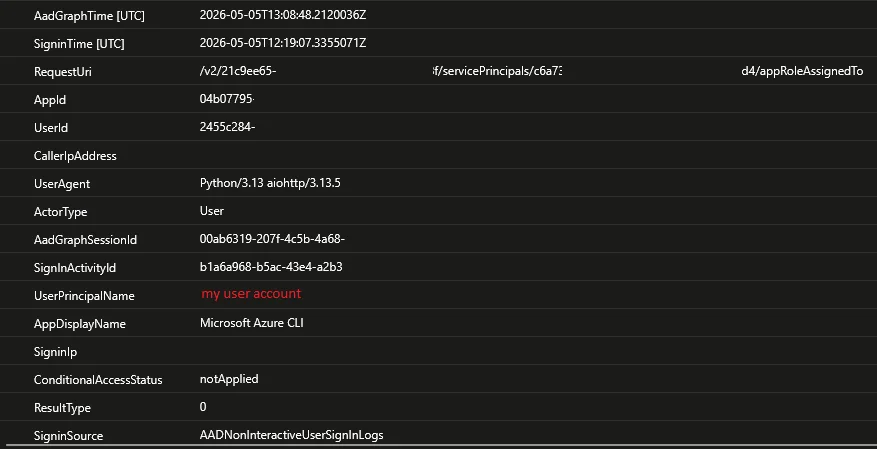
Again, some useful insights from Invictus IR for this query: AADGraphActivityLogs.SignInActivityId may keep trailing == padding while SigninLogs.UniqueTokenIdentifier does not, so strip trailing = first. When I checked, there was never an instance of this happening, but I had a small sample size so for now I’ll keep the trim going.
Correlation matrix
This is current based on my testing as of 05/05/2026, but might be updated in the future.
Field in AADGraphActivityLogs | Also present in table | FieldName (if not the same) |
|---|---|---|
SessionId | SigninLogs, MicrosoftGraphActivityLogs, AADNonInteractiveUserSignInLogs, Unified Audit Log | N/A |
SignInActivityId | MicrosoftGraphActivityLogs | N/A |
SignInActivityId | SigninLogs | UniqueTokenIdentifier* |
SignInActivityId | AADNonInteractiveUserSignInLogs | Id |
CorrelationId | SigninLogs, AuditLogs | N/A |
*Microsoft documents UniqueTokenIdentifier in sign-in logs as the UTI claim, and maps that same claim to SignInActivityId in Microsoft Graph activity logs. AADGraphActivityLogs exposes SignInActivityId, so this is the closest documented token-level pivot. Normalize trailing = first before joining.
Closing thoughts
As much as I’d like to see Azure AD Graph go away, this is a welcome addition to any security outfit to fill a gap, as noted by Fabian Bader in the initial tweet when this was first discovered.
The queries presented in this blog is mostly to detect people running the named out-of-the-box without modifications. It could be a decent place to start for some more advanced queries, detection rules in some small environments or simply as hunting queries.