Microsoft Sentinel Log Baseline: Cost vs Detection Value
Alright, a short while ago I released Log Horizon to help people make practical decisions about log baselines. The baseline in the tool is intentionally generic, because to make it specific requires a missing piece.
That missing piece is of course context. The same data source or table can be primary in one company and secondary in another. That depends on what matters most to the business, what threats you care about, and what your team can realistically operate.
This post provides a compact “framework” for making those decisions between which category a log source fall into, in the form of decision trees.
Primary and secondary security data
We’ve already mentioned primary and secondary in the intro, but it’s one way to split security data into two distinct categories:
- Primary security data: data used for active detection and threat hunting. It should be searchable with full query capabilities and low operational friction.
- Secondary security data: data retained for investigation depth, compliance, historical context, or delayed analytics where slower query paths are acceptable.
In Microsoft Sentinel terms, this maps well to:
- Analytics tier for primary data.
- Data lake tier for secondary data.
This is a practical mapping, not a strict rule.
%%{init: {"theme": "base", "themeVariables": {"fontFamily": "Trebuchet MS, Segoe UI, sans-serif", "primaryColor": "#eaf3ff", "primaryBorderColor": "#2b6cb0", "primaryTextColor": "#8d94a3", "lineColor": "#334155", "tertiaryColor": "#f8fafc"}}}%%
graph LR
    A[Log source table] --> B{Detection and hunting value now?}
    B -- High --> C[Primary data]
    B -- Lower or delayed --> D[Secondary data]
    C --> E[Analytics tier]
    D --> F[Data lake tier]
    F --> G[KQL job or summary promotion]
    G --> E

    classDef decision fill:#fff7ed,stroke:#c2410c,stroke-width:2px,color:#7c2d12;
    classDef primary fill:#e0f2fe,stroke:#0369a1,stroke-width:2px,color:#0c4a6e;
    classDef secondary fill:#f1f5f9,stroke:#475569,stroke-width:2px,color:#0f172a;
    classDef action fill:#dcfce7,stroke:#166534,stroke-width:2px,color:#14532d;

    class B decision;
    class C,E primary;
    class D,F secondary;
    class A,G action;
Prices follow functionality, as per the visual below.
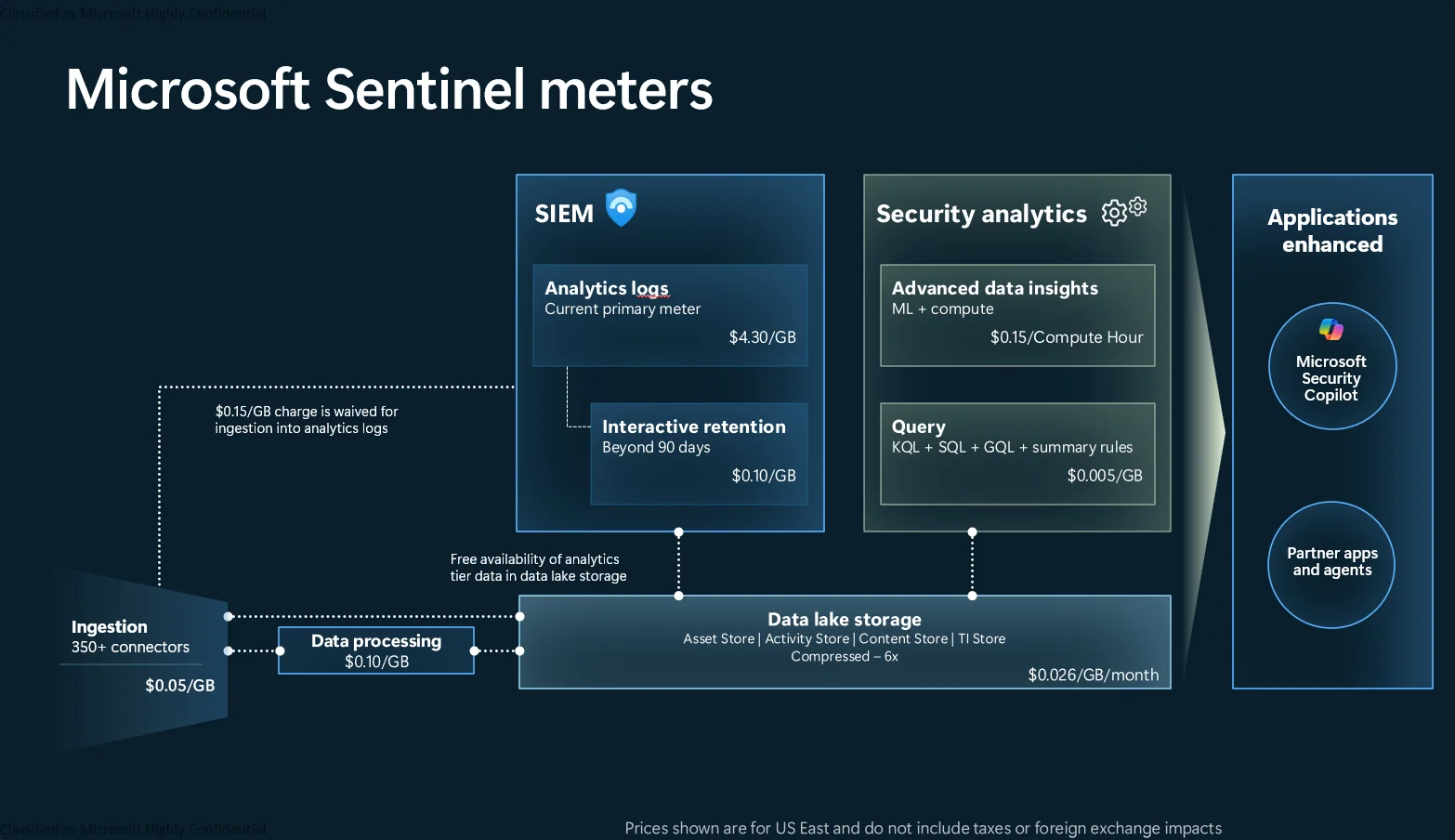
The critical detail is that decisions are reversible. You can split ingestion, promote selected data, and change tiering as your environment evolves.
How this works in Sentinel today
Data connectors ingest and map events to tables. That means decisions are usually made at table level, not connector level. There are exceptions where a connector = table, of course.
Examples:
- Entra ID data can land in multiple tables such as
SigninLogs,AuditLogs, and more. - A security product may write alerts into one table and verbose telemetry into another.
For most teams, table-level governance gives the best control over cost and detection coverage.
Practical options you have
- Send full table to analytics tier.
- Send full table to data lake tier.
- Split the table so high-value events stay in analytics tier while lower-value volume goes to data lake tier.
- Filter redundant fields or low-value rows at ingestion.
- Promote selected lake data into analytics tier using scheduled jobs when detection requires it.
This is the core tradeoff “model”:
%%{init: {"theme": "base", "themeVariables": {"fontFamily": "Trebuchet MS, Segoe UI, sans-serif", "primaryColor": "#eaf3ff", "primaryBorderColor": "#2b6cb0", "primaryTextColor": "#8d94a3", "lineColor": "#334155", "tertiaryColor": "#f8fafc"}}}%%
graph TD
    A[Table volume] --> B{Immediate detection needed?}
    B -- Yes --> C[Analytics tier]
    B -- No --> D[Data lake tier]
    C --> E{Too expensive?}
    E -- Yes --> F[Split and filter]
    E -- No --> G[Keep as is]
    D --> H{Need detections later?}
    H -- Yes --> I[Promote subset on schedule]
    H -- No --> J[Retain for hunt, IR, compliance]

    classDef decision fill:#fff7ed,stroke:#c2410c,stroke-width:2px,color:#7c2d12;
    classDef primary fill:#dbeafe,stroke:#1d4ed8,stroke-width:2px,color:#1e3a8a;
    classDef secondary fill:#e2e8f0,stroke:#475569,stroke-width:2px,color:#0f172a;
    classDef optimize fill:#dcfce7,stroke:#166534,stroke-width:2px,color:#14532d;

    class B,E,H decision;
    class C primary;
    class D,J secondary;
    class F,G,I,A optimize;
And this is the same “model” from a cost, latency, and capability perspective:
%%{init: {"theme": "base", "themeVariables": {"fontFamily": "Trebuchet MS, Segoe UI, sans-serif", "primaryColor": "#eaf3ff", "primaryBorderColor": "#2b6cb0", "primaryTextColor": "#8d94a3", "lineColor": "#334155", "tertiaryColor": "#f8fafc"}}}%%
graph LR
    A[Analytics tier
    Higher cost per GB
    Lower query latency
    Limited KQL support] --> B[Primary data]
    C[Data lake tier
    Lower storage cost
    Higher query latency
    Full KQL support] --> D[Secondary data]
    C --> E[Scheduled promotion path]
    E --> A

    classDef analytics fill:#dbeafe,stroke:#1d4ed8,stroke-width:2px,color:#1e3a8a;
    classDef lake fill:#e2e8f0,stroke:#475569,stroke-width:2px,color:#0f172a;
    classDef label fill:#fef3c7,stroke:#b45309,stroke-width:2px,color:#78350f;
    classDef action fill:#dcfce7,stroke:#166534,stroke-width:2px,color:#14532d;

    class A analytics;
    class C lake;
    class B,D label;
    class E action;
Important note: promotion paths are practical, but they are not equivalent to real-time detection on analytics-tier data. If you rely on scheduled promotion, account for ingestion delay, job cadence, and added operational complexity when setting detection expectations.
Why a generic baseline still helps
A generic baseline is useful for two main reasons:
- It accelerates first decisions.
- It creates a shared language for discussion.
Another point could be that it helps teams without the required subject matter expertise create a base level of security.
How the Log Horizon baseline was created
In Log Horizon, the baseline is built from public guidance and then through iterative review (we’re working on this). This includes standards and best-practice guidance from bodies such as NIST and CISA, plus vendor documentation and field experience.
All these standards and best-practice documents are fed into an AI agent that iterates over a list of data connectors with my own initial assessment as context. Human verification was done on a subset of the baseline after the AI improvements to make sure it was in line with expectations and to correct mistakes, which again feeds back into another pass.
If you disagree with a classification, that is expected. Submit an issue or pull request and challenge it. Baselines should improve through use and there are several areas I lack the depth of knowledge to make anything but a qualified “guesstimation” decision myself. It’s still a work in progress and will likely be that way forever!
Event-type to tier mapping
The standards used (you can find a non-exhaustive table at the bottom of the article) list categories and outcomes more than product-specific tables. To make this actionable, this matrix maps common event types to baseline tiering decisions.
Important context: this is an interpretive mapping framework. Standards usually define required outcomes and log categories, while your environment determines final primary versus secondary placement.
| Event type | Why standards care | Example standards references | Baseline tier mapping | Typical Sentinel tables |
|---|---|---|---|---|
| User sign-in and authentication | Core identity attack surface, account misuse detection, incident reconstruction | ACSC best practices p.9-11, ACSC priority logs detailed guidance, CISA M-21-31 p.2 | Primary for failures, risk events, privileged sign-ins, unusual auth patterns. Secondary for routine successful authentications at high volume | SigninLogs, AADNonInteractiveUserSignInLogs, DeviceLogonEvents, SecurityEvent |
| Privilege and role changes | Direct path to persistence and impact escalation | ACSC priority logs detailed guidance, ACSC best practices p.11, CISA M-21-31 p.2 | Primary by default for role assignment, entitlement changes, admin group changes | AuditLogs, AzureActivity, SecurityEvent |
| Administrative and control plane operations | Tracks configuration drift, destructive actions, and unauthorized management activity | ACSC best practices p.11, ACSC priority logs detailed guidance, CISA M-21-31 p.2 | Primary for write, delete, policy, and failed admin actions. Secondary for low-risk read-only operations | AzureActivity, AzureDiagnostics, cloud provider activity logs such as AWSCloudTrail |
| Remote access and lateral movement signals | Early indicator of compromise progression and interactive attacker behavior | ACSC best practices p.9-11, ACSC priority logs detailed guidance | Primary for remote interactive, anomalous source, failed remote auth, and privileged remote sessions. Secondary for stable operational baseline traffic | SecurityEvent, DeviceLogonEvents, VPN/firewall logs in CommonSecurityLog |
| Endpoint process execution | Critical for malware, script abuse, LOLBin detection, and triage detail | ACSC best practices p.6 and p.9, ACSC priority logs detailed guidance | Primary for suspicious process lineage and high-risk binaries. Secondary for repetitive low-risk process telemetry | DeviceProcessEvents, SecurityEvent |
| Network security events (allow, deny, alert) | Supports detection of C2, scanning, data exfiltration, policy bypass | ACSC priority logs detailed guidance, ACSC best practices p.9-11 | Primary for deny, block, reset, alert, and high-severity outcomes. Secondary for high-volume allow traffic unless needed for specific detections | CommonSecurityLog, WindowsFirewall, DeviceNetworkEvents |
| Security product alerts and findings | Highest confidence signal of active detection logic | ACSC priority logs detailed guidance, CISA expanded cloud logs p.15 | Primary by default. These are usually direct detection inputs | SecurityAlert, AlertInfo, product-specific alert tables such as AWSGuardDuty, CommonSecurityLog in some cases |
| Data access and audit trail events | Needed for incident scope, insider activity, and compliance evidence | CISA expanded cloud logs p.15-23, ACSC best practices p.7, Google audit log types | Primary for sensitive data access anomalies and high-risk audit actions. Secondary for routine low-risk access events | OfficeActivity, AuditLogs, storage audit tables |
| Email and collaboration activity | Phishing, business email compromise, and malicious content propagation | CISA expanded cloud logs p.15-23, ACSC priority logs detailed guidance | Primary for suspicious mailbox actions, rule abuse, external sharing risk, and malicious message events. Secondary for low-risk collaboration exhaust | EmailEvents, EmailAttachmentInfo, EmailUrlInfo, EmailPostDeliveryEvents, OfficeActivity |
Primary vs secondary threshold guide
Use this simple decision tree before finalizing tier choice for a table.
%%{init: {"theme": "base", "themeVariables": {"fontFamily": "Trebuchet MS, Segoe UI, sans-serif", "primaryColor": "#eaf3ff", "primaryBorderColor": "#2b6cb0", "primaryTextColor": "#8d94a3", "lineColor": "#334155", "tertiaryColor": "#f8fafc"}}}%%
graph TD
    A[Start with one table] --> B{Referenced by production analytic rules or hunts?}
    B -- Yes --> C[Set Primary]
    B -- No --> D{Contains identity, privilege, control-plane, or security-alert events?}
    D -- Yes --> E[Set Primary by default]
    D -- No --> F{Needed for incident triage within SLA?}
    F -- Yes --> G[Set Primary or split]
    F -- No --> H{High volume and low detection value?}
    H -- Yes --> I[Set Secondary and consider promotion path]
    H -- No --> J[Keep Secondary with periodic review]

    classDef decision fill:#fff7ed,stroke:#c2410c,stroke-width:2px,color:#7c2d12;
    classDef primary fill:#dbeafe,stroke:#1d4ed8,stroke-width:2px,color:#1e3a8a;
    classDef secondary fill:#e2e8f0,stroke:#475569,stroke-width:2px,color:#0f172a;
    classDef neutral fill:#ecfeff,stroke:#0e7490,stroke-width:2px,color:#164e63;

    class B,D,F,H decision;
    class C,E,G primary;
    class I,J secondary;
    class A neutral;
Practical threshold defaults for teams that need a starting point:
- Primary if the table is used in one or more production detections or weekly hunting.
- Primary if delayed access would break incident triage SLAs.
- Secondary if ingestion is high and detections are zero or low, unless the table is required for a known threat model scenario.
- Split when one table mixes high-value events with high-volume low-value events.
Practical proposal: treat standards as category constraints, then apply explicit operational thresholds so the final mapping is testable and reviewable.
Use this as a baseline map, then tighten it with your threat model and your detection content inventory.
A practical mini-framework for table decisions
Use this lightweight flow for each important system or application.
%%{init: {"theme": "base", "themeVariables": {"fontFamily": "Trebuchet MS, Segoe UI, sans-serif", "primaryColor": "#eaf3ff", "primaryBorderColor": "#2b6cb0", "primaryTextColor": "#8d94a3", "lineColor": "#334155", "tertiaryColor": "#f8fafc"}}}%%
graph TD
    A[Choose business-critical system] --> B[Identify crown-jewel assets]
    B --> C[Model likely and high-impact attacks]
    C --> D[List required detections and hunts]
    D --> E[Map detections to required tables and fields]
    E --> F{Needed for live detection?}
    F -- Yes --> G[Primary
    Analytics tier]
    F -- No --> H[Secondary
    Data lake tier]
    G --> I{Volume or cost too high?}
    I -- Yes --> J[Split or filter]
    I -- No --> K[Keep as full analytics]
    H --> L{Need delayed detection?}
    L -- Yes --> M[Promote selected subset on schedule]
    L -- No --> N[Retain for compliance and deep forensics]

    classDef step fill:#ecfeff,stroke:#0e7490,stroke-width:2px,color:#164e63;
    classDef decision fill:#fff7ed,stroke:#c2410c,stroke-width:2px,color:#7c2d12;
    classDef primary fill:#dbeafe,stroke:#1d4ed8,stroke-width:2px,color:#1e3a8a;
    classDef secondary fill:#e2e8f0,stroke:#475569,stroke-width:2px,color:#0f172a;
    classDef optimize fill:#dcfce7,stroke:#166534,stroke-width:2px,color:#14532d;

    class A,B,C,D,E step;
    class F,I,L decision;
    class G,K primary;
    class H,N secondary;
    class J,M optimize;
This keeps decisions grounded in business risk rather than table popularity.
Field filtering without breaking detection
Filtering is useful, but risky when done blindly. A safer approach is:
- Start from detection logic and hunting queries already in use.
- Identify which fields are actually referenced.
- Keep those fields and core correlation identifiers.
- Remove redundant or low-value payload where appropriate.
- If uncertain, split instead of dropping.
In log-horizon, Data/high-value-fields.json provides practical examples for tables like SecurityEvent, SigninLogs, CommonSecurityLog, and AzureActivity.
Typical high-value identifiers across many scenarios:
- Identity: account identifiers, tenant context, auth result, risk indicators.
- Endpoint/process: process lineage, command line, hash, host identity.
- Network: source and destination, action, protocol, port, severity.
- Cloud control plane: caller, operation, status, resource, correlation IDs.
One pragmatic pattern is to keep full-fidelity data in data lake tier and route a reduced, detection-focused subset to analytics tier. That preserves audit depth while reducing premium-tier cost.
Practical custom classification examples
To make this operational, here is a small but concrete example that ends in a custom classification file for Log Horizon.
Example: Keep firewall allow traffic as secondary, but retain deny and alert path as primary
Scenario:
CommonSecurityLogis one of your largest tables.- Detections mainly depend on deny, block, reset, and alert-type events.
- Allow traffic is useful for investigations and sometimes hunting, but not for daily live detection.
Decision:
- Keep the full table in data lake for investigation depth.
- Apply split rule to keep high-value deny and alert outcomes in analytics tier.
- Classify table as secondary in baseline and document split rule logic.
You can then create a custom classification for Log Horizon to highlight this when running the tool.
Example custom classification entry (for Log Horizon):
[
    {
        "tableName": "CommonSecurityLog",
        "connector": "CEF/Syslog",
        "classification": "secondary",
        "category": "Network Security",
        "description": "Baseline classification is secondary due to very high volume of low-value allow traffic. A split keeps deny/block/alert outcomes in analytics tier for live detection.",
        "keywords": ["firewall", "proxy", "cef", "network"],
        "mitreSources": [],
        "recommendedTier": "datalake",
        "isFree": false,
        "recommendedRetentionDays": 365
    }
]
This pattern keeps the baseline general and environment-specific overrides explicit.
Where Log Horizon fits
Log Horizon can help you:
- Get an initial primary or secondary recommendation at scale.
- Compare ingestion cost against detection coverage.
- Spot candidates for tiering, filtering, or split logic.
It does not replace internal threat modeling. It gives you a baseline so your team can spend energy on the decisions that require context.
Summary
A practical log baseline is not about collecting everything in one tier. It is about aligning data placement with detection value.
- Classify by use case: live detection vs delayed depth.
- Keep analytics tier focused on high-value, actionable data.
- Use data lake tier for broad context, long retention, and cost control.
- Split and filter with field-level intent, don’t guesstimate (too much, at least).
- Revisit decisions as threats, systems, and detections change.
“Wait, I can’t just copy and paste a baseline?”
I mean, sure you can, but putting in some work will net you greater returns (and most certainly a better cost/value balance). We can pretend budgets doesn’t exist for all we want, but they do and we should aim to get the most mileage out of we are given.
 You, the reader, probably?
If you want a starting point, run Log Horizon. It’s not perfect, but it could be a starting point. If your environment disagrees with the generic baseline, customize it and add a custom overrides. Spot anything glaringly wrong? Open a PR or issue so the shared baseline keeps improving.
Standards-backed event priorities
Below is a compact mapping that prioritizes sources explicitly listing log types, event types, or concrete data sources to ingest.
| Source | Section or reference point | What it emphasizes | Practical implication for baseline |
|---|---|---|---|
| ACSC: Best practices for event logging and threat detection (Aug 2024) | Logging priorities and category-level source guidance for enterprise/cloud/mobility (identity, internet-facing systems, admin changes, cloud API/auth) | Priority log sources by environment and explicit category guidance | Treat identity, control plane/admin change, and high-risk endpoint/network categories as default primary candidates |
| ACSC: Priority logs for SIEM ingestion - Practitioner guidance (May 2025) | Detailed logging guidance by source category (EDR, network devices, AD/DC, endpoints, cloud, containers, database, MDM, DNS, Linux, macOS) | Concrete category-driven ingestion prioritization | Use this as the strongest category-level source for SIEM onboarding order |
| CISA: Microsoft Expanded Cloud Logs Implementation Playbook (2025) | Section 2.3-2.4 and appendices: cloud audit event families for mailbox/search/collaboration activity and investigative fields | Product-specific cloud data-type guidance for investigations and detections | Map email and collaboration audit categories to primary when they are active detection or triage inputs |
| CISA: Guidance for Implementing M-21-31 | Prioritization of deployment/collection for high-value assets, identity providers, and internet-facing systems | Risk-based prioritization for log onboarding and retention | Prioritize identity-plane and externally exposed system categories first, then broaden coverage |
| NIST SP 800-92 | Section 2 and Appendix D taxonomy (application, audit, authentication server, antimalware, IDS/IPS log types) | Canonical log-management terminology and broad log-type taxonomy | Use as normalization vocabulary and governance baseline rather than event-ID granularity |
| Microsoft Sentinel billing | How you’re charged for Microsoft Sentinel | Tier economics and feature differences | Treat analytics tier as premium detection surface, data lake as cost-efficient depth |
| Microsoft Sentinel data tier management | Compare the analytics and data lake tiers | Functional differences between analytics and data lake | Design detections around analytics data or promoted subsets |
| Google Cloud Audit Logs overview and best practices | Explicit audit-log categories (Admin Activity, Data Access, System Event, Policy Denied) and collection guidance | Cross-hyperscaler consistency for admin, policy, and data-access logging categories | Treat control-plane/admin, denied policy, and required data-access categories as primary candidates |
The common denominator is consistent: prioritize identity, control plane, admin change, and security product telemetry for fast detection; keep broad context and high-volume low-signal data in lower-cost tiers when possible.