Could you build a simple C2-framework using World of Warcraft?
Before you read onwards, let me clarify - the title is a bit clickbaity. While creating a C2 using only World of Warcraft is certainly possible using methods described in this article, my approach is using a common third party service that allows you to upload combat data. So it’s not a C2 in World of Warcraft directly, but rather the ecosystem around it.
These are just notes for myself and I don’t really think you’ll get anything out of reading this, just to be upfront.
Why would anyone do this?
I don’t know. I had this idea during some fever dreams during a two week manflu back in December and decided to test. I want to be very clear, this is not a C2-framework I will be releasing, just something I wanted to validate.
I will also not actually implement anything live that abuses the third-party service WarcraftLogs that this idea revolves around. I will test my concept by doing API calls that are inside the normal usage of the service, and then be able to verify that this idea would work in theory.
What is combat logging in World of Warcraft?
So I hope everyone knows what World of Warcraft is - if you don’t, well, it’s a giant massively multiplayer online (MMO) game. The games endgame is about coming together in big groups of players, called raids and defeating bosses. Long story very short, some of these raids tend to get very serious, there’s even big events called “Race to World First” where thousands of guilds compete to be the first to kill all the bosses in the newest raids.
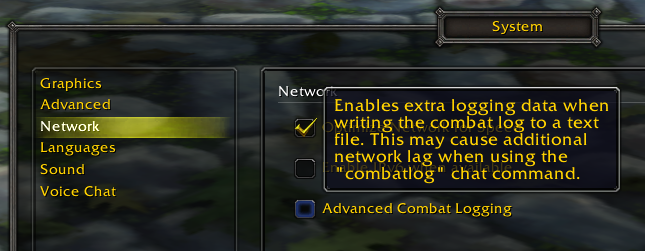
One of the most important tools used by these guilds to conquer these raids is combat logging. Basically the game allows you to enable advanced combat logging, which writes every detail about your fights to a logfile in .txt format on your drive.
Raids consist of everything from 10 to 40 players depending on the versions of WoW you play (not going to get into all the different ones), but for our use case we want to go for the basic version of WoW called Vanilla, but specifically the Wrath of the Lich King expansion. The reason for this is that the amount of players can be 10 or 25, and I still have logs from playing the game to use as examples.
To keep it simple, whenever a player uses an ability it’s logged to the combat log:

Abilities are often called spells. Players and their familiars (pets, summons) attack enemies using spells and melee (axe, sword and similar). The result of this interaction is what is stored in the combat logs. It’s not only the data from your character, it’s the data from everyone in your vicinity. This means you would only usually have a single person on “log duty” for a raid.
Uploading logs
For uploading logs, we typically do something called “Live logging”, which uses a tool called Warcraft Logs Uploader. This tool can be pointed to the /Logs folder in your WoW folder where the raw txt-files containing the log data is generated.
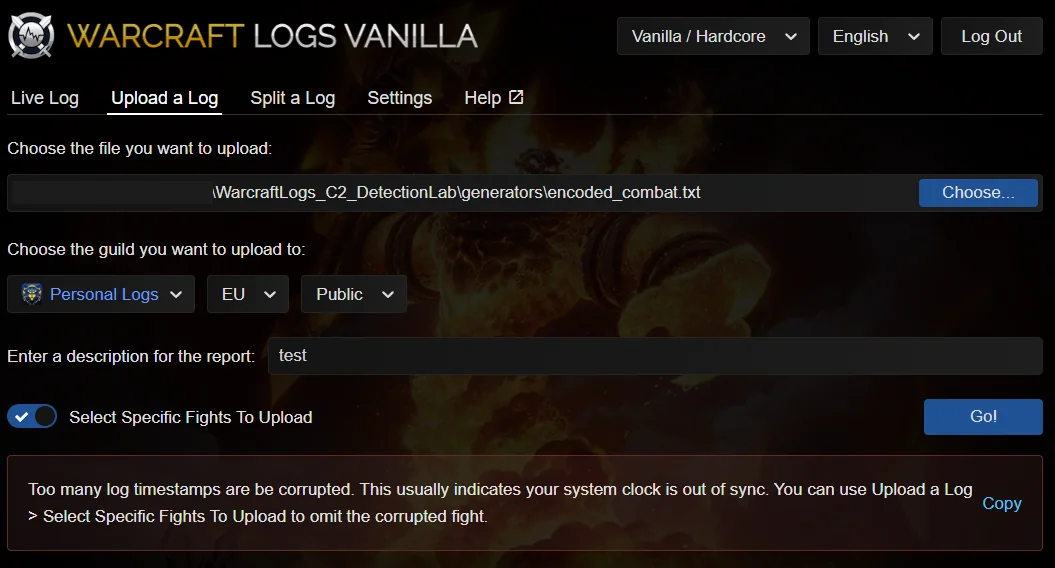
The uploader has some simple ways to validate that the files are valid, so people can’t cheat by modifying the logs. This is mainly to do with not making yourself look better or the time to kill look faster, not really concerned with detecting idiots trying to encode C2-data.
Uploading the files allows you to analyze the fight on https://www.warcraftlogs.com:
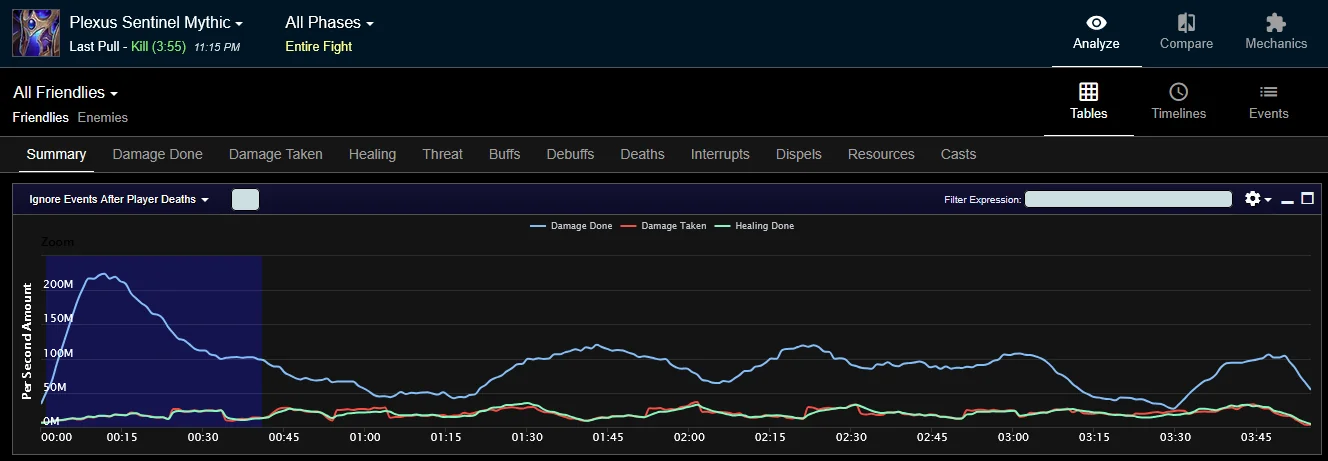
Live logging in detail
One idea that I will explore later is the concept of using live logging to send commands. How it would work is described in the flowchart below.
flowchart TD
    subgraph "REAL"["World of Warcraft"]
        C[Character] -->|Uses|S[Spell] --> CombatLog
    end

    subgraph Upload["Upload"]
        P3[Warcraft Log Uploader] --> L[Live logging] --> W[WarcraftLogs]
    end

    subgraph Convert["Beacon"]
        P2[beacon.ps1] --> |Read| W --> E[Execute commands]
    end
    CombatLog --> Upload
    CombatLog -.-> E
Each of the playable classes (think of this as different heroes) in World of Warcraft has a library of different spells. You could hit a special enemy, such as a target dummy (which can never die, which works well for us) and then create a map between a spell and a character. In this case the spell Arcane Shot could be A. Each spell has multiple ranks in the classic versions of the game, allowing us to map multiple characters to a single spells rank. To put that into cleartext, Arcane Shot - Level 1 would be A, Arcane Shot - Level 2 would be a, Arcane Shot - Level 3 could be B and so on.
All you would need to do to send commands is the following:
- Start live logging
- Start attacking the target to send characters in a specific order
- Once combat ends, the log is uploaded
- The beacon will poll the API at regular intervals, looking for new reports (which is what a collection of combat logs within a certain timeframe is called)
- Once a new report is found, download it and decode the commands
This would be a bit of a pain to implement, and with the ability to create AddOns (will explain this later) removed for now it also becomes a big pain to execute.
The concept
My core concept was to hide in plain sight. Masquerading as normal behavior and traffic. Maybe people don’t play many games in coorporate environments, but who would suspect foul play? Maybe it’s another person playing games on company time.
My original idea breaks down into three simple steps:
- Create a way to encode commands to a combat log
- Either by modifiyng existing logs
- Creating new synethtic logs from scratch
- By casting spells in a specific sequence and mapping the spells to characters
- Upload the report
- Create a script that reads the report and executes the commands
Now, to clarify, I will not be executing the parts of this idea that absuses third party sites. I will encode commands into a log and verify it bypasses upload checks, but I will not upload data to the WarcraftLogs service.
I will also only do simple API calls towards my own previous log data and compare it to my local files to verify some information about how data is parsed and trimmed, but nothing further than that.
If I’m able to upload data in theory then that is enough for me to know that it could work. Again, I don’t like abusing third-party services, and especially not one that’s as awesome as WarcraftLogs.
Log format
The log format is pretty simple, every file starts with the COMBAT_LOG_VERSION, ADVANCED_LOG_ENABLED (upload to WarcraftLogs fails if this is not 1), BUILD_VERSION and PROJECT_ID.
What you see below is us loading into the raid Ulduar. Then you see a character, Itsame (fictional) get a spell applied. SPELL_AURA_APPLIED means that someone activated an aura, which is usually raid-wide. There’s also party-wide, but for the sake of this post let’s not get into it.
2/9 18:59:03.696  COMBAT_LOG_VERSION,9,ADVANCED_LOG_ENABLED,1,BUILD_VERSION,3.4.1,PROJECT_ID,11
2/9 18:59:03.696  ZONE_CHANGE,603,"Dalaran",0
2/9 18:59:03.696  MAP_CHANGE,149,"Ulduar",2564.679932,1679.040039,653.721008,-674.739990
2/9 18:59:04.868  SPELL_AURA_APPLIED,Player-4476-0469E16F,"Itsame-Gehennas",0x511,0x0,Player-4476-0469E16F,"Itsame-Gehennas",0x511,0x0,48266,"Blood Presence",0x1,BUFF
What we can get out of this though is that the logs will accept changes to the name. I was worried it would throw errors for many unique names outside of the normal allowance in WoW:
- No numbers
- Only first letter is capital
- No special characters
- Some names are reserved, such as
Administrator
“Fun” fact,
Adminwas not reserved, so my warrior was called that for a while until I was banned and forced to change my name.
Options for implementation
From my testing though, using numbers in names was accepted by WarcraftLogs. I saw three possible ways to implement this solution
- Just match on the pattern
-Gehennas(name of a server) for existing combat logs and replace the names with up to 25 unique names that had the characters encoded. - Create a fake log generator that used my existing logs as examples. I had no chance to actually create this within a viable timeframe, so I had AI test this for me. After a few hours it turned out that just getting the AI to generate something that could generate the logs was hard enough, but to also encode and decode data was just taking too long.
- Live logging data from a character mapping each spell to a certain character. This would require the most amount of work, but would probably be the best option.
As a quick note on option 3, this was more viable previously where you could create AddOns, which are player-made extensions to the game. This way you could create an addon that simply let you type in the commands you wanted to send, and it would give you the keybinds (which keys to press) in what order to execute the command.
As I wanted to just do a simple verification that something like this could work I went with option 1. I also tried 2, but this would generate the same logs with new names each time and would likely be very obvious. To make the logs “different”, i.e from different fights would be a lot of work. It’s doable, but maybe later.
Modifying existing logs
This was quite simple, modifying existing logs was all about replacing character names. I would take the real logs as input, use a simple converter and then upload the file.
flowchart TD
    subgraph "REAL"["Input"]
        P1[original_combatlog.txt]
    end

    subgraph Convert["Convert"]
        P2[converter.ps1]
    end

    subgraph Upload["Upload"]
        P3[Warcraft Log Uploader]
    end
    REAL --> Convert --> Upload
Some of the constrains here I wanted to adhere to was:
- Maximum of 25 unique character names, which was where I was storing my information.
- No illegal characters.
So the amount of data that could be encoded was limited by this fact, but character names can have some length to them so that was quite simple. Now there’s are a few issues here.
- Character names in the examples are known by the following standard “Charactername-Gehennas” with Gehennas being the server.
- Character names might appear twice in a line, this means one character is affecting itself.
- Two character names might appear in a line, this means a character is affecting another character.
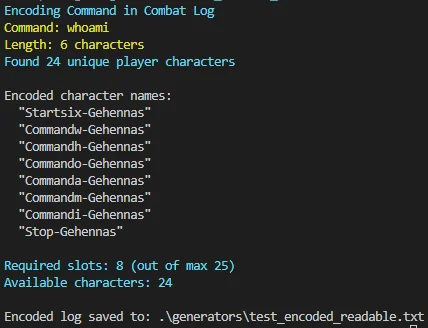
Now, I wanted to make sure the first character was named Start. The next character after start is the first part of the command. If the command is whoami then the last character of the character name is the first letter of the command. Example is, first character after Start should be Commandw.
This would give us 23 total input characters of our commands per logs, as I wanted to adhere to my rules. If the command is longer, we can have multiple parts of the command for each character, such as Commandwho. This could indicated in the Start-character, which would then be Startthree instead of the normal one. The last character after the command is encoded should be Stop.
The idea would be that the first entries from the first Start to the first Stop would make it easier to parse out the commands later. Not very stealthy, but I just wanted to test my idea to be honest.
Decoding the logs
One issue I faced early on was that logs were so huge that just trying to read from them took forever. One minor tweak here was to make sure the information was encoded in the beginning of the logs files (first 3000 lines) to make reading more effective, as we could limit our reading. If you die a lot to these bosses (wipe, as we call it) these files are quite big. My files are very big…
In the end, since the logs I used were all different I improvised by having my script create fake SPELL_AURA_APPLIED to get consistent behavior no matter what.
I had to get some agent help with all the regex for parsing the data, as I kept failing to make it work. The log files are nightmare in that sense (and I suck at regex):
param(
    $InputLog
)

Write-Host "Decoding Command from Combat Log"

$logLines = Get-Content $InputLog -TotalCount 3000
$logContent = $logLines -join "`n"

$characterPattern = '"([A-Za-z][A-Za-z0-9]*)-([A-Za-z]+)"'
$matches = [regex]::Matches($logContent, $characterPattern)

$uniqueNames = @()
$seen = @{}

foreach ($match in $matches) {
    $charName = $match.Groups[1].Value
    $server = $match.Groups[2].Value
    $fullName = "$charName-$server"

    if (-not $seen.Contains($fullName)) {
        $uniqueNames += $charName
        $seen[$fullName] = $true
    }
}

Write-Host "Found $($uniqueNames.Count) unique character names"

$startIndex = -1
$commandLength = 0

for ($i = 0; $i -lt $uniqueNames.Count; $i++) {
    if ($uniqueNames[$i] -match '^Start(.+)$') {
        $startIndex = $i
        $lengthIndicator = $matches[1]

        $lengthMap = @{
            "one" = 1; "two" = 2; "three" = 3; "four" = 4; "five" = 5
            "six" = 6; "seven" = 7; "eight" = 8; "nine" = 9; "ten" = 10
            "eleven" = 11; "twelve" = 12; "thirteen" = 13; "fourteen" = 14; "fifteen" = 15
            "sixteen" = 16; "seventeen" = 17; "eighteen" = 18; "nineteen" = 19; "twenty" = 20
        }

        if ($lengthMap.Contains($lengthIndicator)) {
            $commandLength = $lengthMap[$lengthIndicator]
        } else {
            $commandLength = [int]$lengthIndicator
        }

        Write-Host "  Found Start marker at position $startIndex"
        Write-Host "  Command length: $commandLength characters"
        break
    }
}

if ($startIndex -eq -1) {
    Write-Warning "No Start marker found in the log"
    Write-Host "`nCharacter names found:"
    $uniqueNames | Select-Object -First 10 | ForEach-Object { Write-Host "  $_" }
    return
}

$command = ""
$commandChars = @()

for ($i = $startIndex + 1; $i -lt $uniqueNames.Count; $i++) {
    $name = $uniqueNames[$i]

    if ($name -eq "Stop") {
        Write-Host "  Found Stop marker at position $i"
        break
    }

    if ($name -match '^Command(.+)$') {
        $char = $matches[1]
        $commandChars += $char
        $command += $char
        Write-Host "  Position $i : Command$char"

        if ($commandChars.Count -eq $commandLength) {
            break
        }
    }
}

Write-Host "`nDECODED COMMAND:"
Write-Host "----------------"
Write-Host "$command"
Write-Host "`n"
It worked!
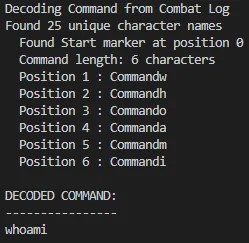
First trial is to make sure the combat log is “valid”. I also added a function to shorten to just 3000 lines to make the parsing faster. This also works (in theory). The logs show no errors in the uploader, and although it showed no bosses, selecting “Include Trash” works as there is a trash mob that has been included. In WoW you refer to as non-boss enemy non-player characters (NPCs) in raids as trash.

How does WarcraftLog handle the logs?
I ran some API queries against logs I previously uploaded as a player and compared it to my local files. What I found is that WarcraftLogs will actually trim the logs to be relevant to the “fights” you have.
So imagine if the synthetic events we injected actually preceed what is considered the start of a fight, it will be trimmed and removed. Sometimes WarcraftLogs also changes the order of things during it’s analysis, so things that happen at the “same time” in your logs might change order, resulting in commands such as whoami being turned into owhm for instance.
This presents a clear problem in all of the methods we suggested, but it’s something that could probably be fixed if engineered enough.
Conclusion
Could this be an effective way to create a C2 framework? Not really, I don’t think so.
There are many limitations to consider, like the fact that WarcraftLogs will parse the logs and trim them resulting in the order of your input being randomized. Of course, there are ways to fix this but I don’t think the time invested really makes sense at all.
There are other limitations also:
- You need to register a user to use WarcraftLogs.
- To use the API you have to set it up and it’s a sign-up and approval process.
- WarcraftLogs removes clients that abuse the API.
- WarcraftLogs will remove invalid logs after analysis is done most of the time.
Of course there’s also OPSEC, creating artifacts that can be used to decipher information about you. If you wanted to do an implementation that uses live logging from the game itself, you’d also need a live account that you’d have to pay for.
To put it bluntly, there are many options to upload data to sites that does not require you to register or that blend in better than this does. This was a fever dream and shouldn’t really be a thing. It’s not really practical at all.
The novel idea behind this post was to explore if I could create a simple C2 framework (I could, but I think anyone can) and my mind went “wouldn’t it be funny if you could use World of Warcraft as a C2”. All I really did was encode information into a text file and decoded it later, and proved that I could upload to a website. The big idea to hide in plain sight would work if you could get around some the other limitations (which again, I think you can but I also don’t think it’s worth it.)
That’s the post. A whole lot of nothing to be honest, but it was fun to explore and I learned a lot of things I would have to consider should I ever fully dive into creating a C2.