Disable correlation for Analytic Rules in Microsoft Sentinel
As I mentioned in my last post on migrating Microsoft Sentinel into Defender XDR you are now able to select analytic rules that doesn’t correlate with other signals in Defender XDR. It’s a huge boon for the migration process.
Updated Apr 2026: This still matters. Correlation strategy is one of the bigger migration pain points, especially across multiple workspaces. Verify behavior against current correlation docs and for broader context check my RSAC recap.
Disable correlation in the UI
Currently, this is limited to two options, the first being UI based. Either during configuration:
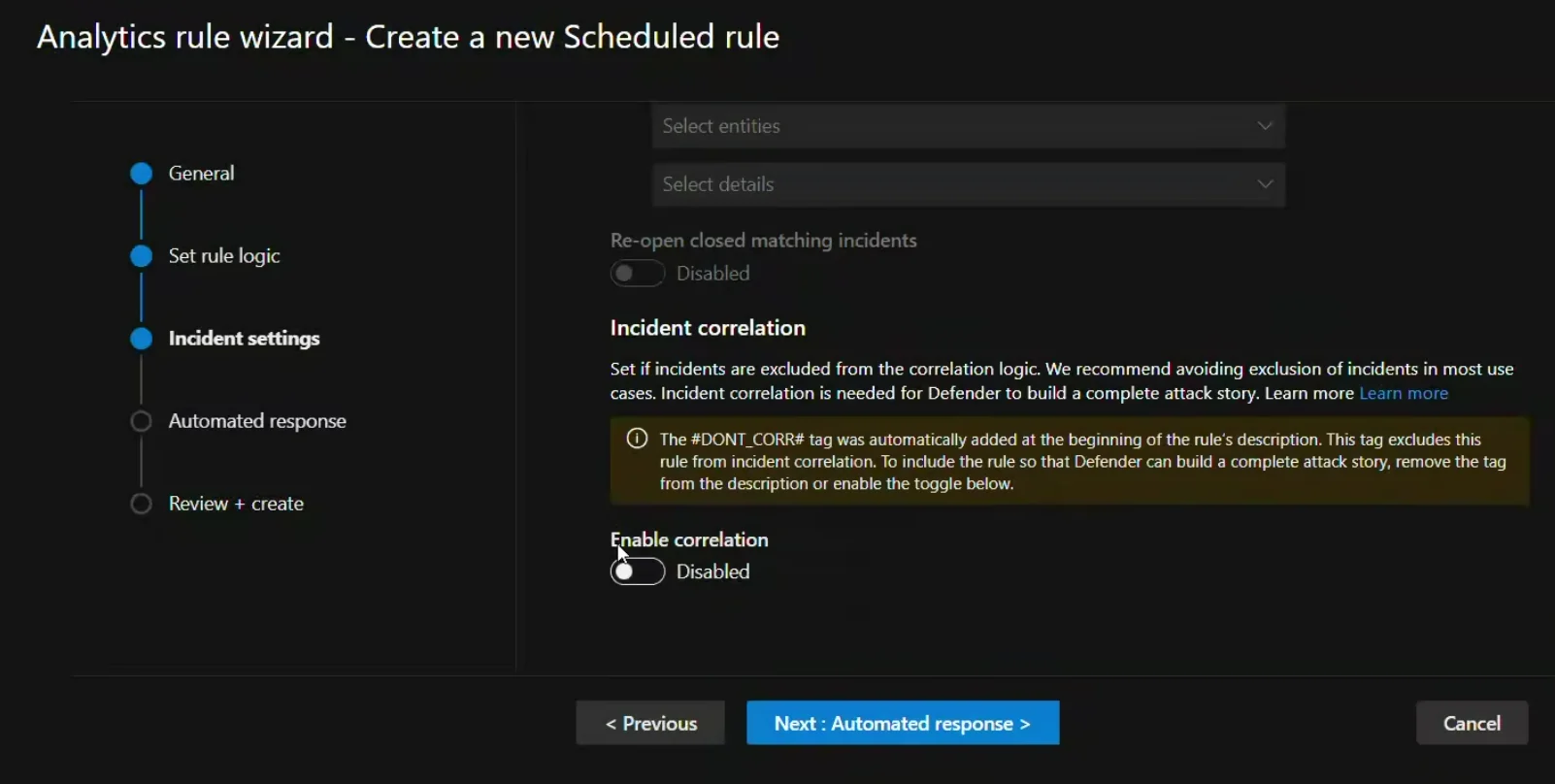
Or you can do it in the analytic rules overview:
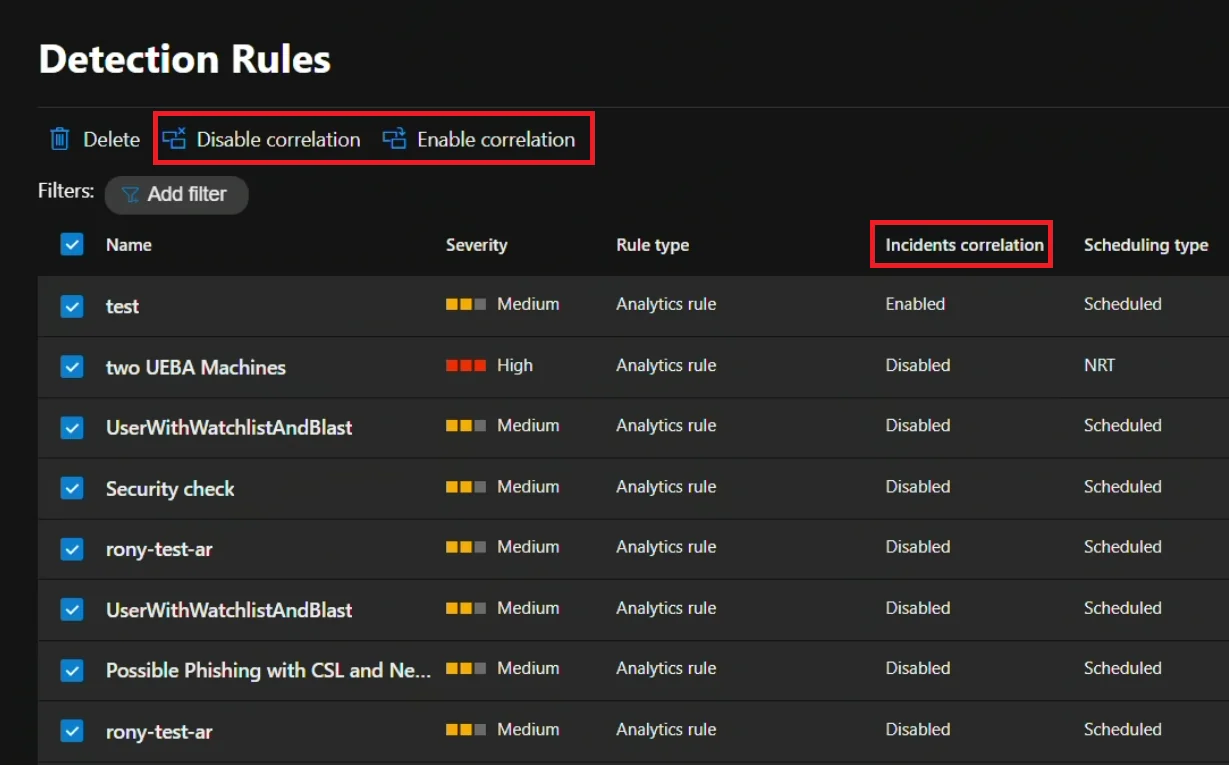
Pretty straight forward, but it’s a little click-opsy for my taste.
Disable correlation in the description field
The other option is to add a tag, but not an actual tag. You add #DONT_CORR# (case insensitive) to your analytic rule description.
The only rule is that the tag must come at the start of the description. What we can do is change the description via code!
Automating the process
Friends doesn’t let friends click to deploy, so I created a script that does this for you. The script uses the Microsoft.SecurityInsights/alertRules API to list out all alert rules and will be default show those that has correlation active. If you want to see everything just supply -ShowAll.
Quick practical note: use exclusion intentionally, not as a blanket rule. If you overuse it, you can accidentally throw away useful signal linking in incident triage.
Currently it’s only interactive, so you supply a comma separated list of numbers and it disables correlation for those. You’ll need to provide the SubscriptionId, ResourceGroup and WorkspaceName for it to work. It can also remove the tag using -RemoveTag.
<#
.SYNOPSIS
    Adds or removes the #DONT_CORR# tag from Sentinel analytics rules.
.DESCRIPTION
    Manages the #DONT_CORR# tag that excludes rules from Defender XDR correlation.
    Reference: https://learn.microsoft.com/en-us/defender-xdr/exclude-analytics-rules-correlation
.EXAMPLE
    .\Set-AnalyticsRuleCorrelationExclusion.ps1 -SubscriptionId "xxx" -ResourceGroup "rg-sentinel" -WorkspaceName "law-sentinel"
#>
param(
    [Parameter(Mandatory)][string]$SubscriptionId,
    [Parameter(Mandatory)][string]$ResourceGroup,
    [Parameter(Mandatory)][string]$WorkspaceName,
    [switch]$RemoveTag,
    [switch]$ShowAll
)

$baseUri = "/subscriptions/$SubscriptionId/resourceGroups/$ResourceGroup/providers/Microsoft.OperationalInsights/workspaces/$WorkspaceName/providers/Microsoft.SecurityInsights/alertRules"
$apiVersion = "?api-version=2023-11-01"

# Get all Scheduled rules
$response = Invoke-AzRestMethod -Path "$baseUri$apiVersion" -Method GET
$rules = ($response.Content | ConvertFrom-Json).value | Where-Object { $_.kind -eq "Scheduled" }

# Filter based on mode
$filtered = if ($ShowAll) { $rules } else {
    $rules | Where-Object {
        if ($RemoveTag) { $_.properties.description -match "^#DONT_CORR#" }
        else { $_.properties.description -notmatch "^#DONT_CORR#" }
    }
}

if (-not $filtered) { Write-Host "No matching rules found."; exit }

# Display numbered list
$i = 1; $menu = @{}
$filtered | ForEach-Object {
    $status = if ($_.properties.enabled) { "Enabled" } else { "Disabled" }
    $corr = if ($_.properties.description -match "^#DONT_CORR#") { "EXCLUDED" } else { "CORRELATED" }
    Write-Host "$i. [$status] [$corr] $($_.properties.displayName)"
    $menu[$i++] = $_
}

# Get selection
Write-Host "`nEnter numbers (comma-separated), 'all', or 'q' to quit:"
$sel = Read-Host
if ($sel -eq 'q') { exit }

$selected = if ($sel -eq 'all') { $menu.Values } else {
    $sel -split ',' | ForEach-Object { $menu[[int]$_.Trim()] } | Where-Object { $_ }
}

if (-not $selected) { Write-Host "No valid selection."; exit }

# Confirm and process
$action = if ($RemoveTag) { "remove tag from" } else { "add tag to" }
Write-Host "`nWill $action $($selected.Count) rule(s). Continue? (y/N)"
if ((Read-Host) -notmatch '^[Yy]') { exit }

foreach ($rule in $selected) {
    $newDesc = if ($RemoveTag) { $rule.properties.description -replace "^#DONT_CORR#\s*", "" }
               else { "#DONT_CORR# " + $rule.properties.description }

    # Remove read-only properties
    $props = $rule.properties.PSObject.Copy()
    @('lastModifiedUtc','createdTimeUtc','alertRuleTemplateName','templateVersion') | ForEach-Object {
        $props.PSObject.Properties.Remove($_)
    }
    $props.description = $newDesc

    $body = @{ kind = $rule.kind; etag = $rule.etag; properties = $props } | ConvertTo-Json -Depth 10
    $result = Invoke-AzRestMethod -Path "$baseUri/$($rule.name)$apiVersion" -Method PUT -Payload $body

    if ($result.StatusCode -in 200,201) {
        Write-Host "[OK] $($rule.properties.displayName)"
    } else {
        Write-Host "[FAILED] $($rule.properties.displayName): $($result.Content)"
    }
}
That’s it - the full script is on my MicrosoftSentinel-Scripts Github.
Using the script
Here is a simple test I did on my infex-law in my Azure tenant:
.\Set-AnalyticsRuleCorrelationExclusion.ps1 -SubscriptionId dummyValue -ResourceGroup infex-hub -WorkspaceName infex-law

1. [Enabled] [CORRELATED] Internet Access (Microsoft Defender for IoT)
2. [Enabled] [CORRELATED] High bandwidth in the network (Microsoft Defender for IoT)
3. [Enabled] [CORRELATED] Multiple scans in the network (Microsoft Defender for IoT)
4. [Enabled] [CORRELATED] Unauthorized remote access to the network (Microsoft Defender for IoT)

Enter numbers (comma-separated), 'all', or 'q' to quit:
1,3

Will add tag to 2 rule(s). Continue? (y/N)
y
[OK] Internet Access (Microsoft Defender for IoT)
[OK] Multiple scans in the network (Microsoft Defender for IoT)
Rerunning with -ShowAll lets me see that two of them are now excluded.
.\Set-AnalyticsRuleCorrelationExclusion.ps1 -SubscriptionId dummyValue -ResourceGroup infex-hub -WorkspaceName infex-law -ShowAll

1. [Enabled] [EXCLUDED] Internet Access (Microsoft Defender for IoT)
2. [Enabled] [CORRELATED] High bandwidth in the network (Microsoft Defender for IoT)
3. [Enabled] [EXCLUDED] Multiple scans in the network (Microsoft Defender for IoT)
4. [Enabled] [CORRELATED] Unauthorized remote access to the network (Microsoft Defender for IoT)
Hope this helps.