Migrating Microsoft Sentinel to Defender XDR: What to Expect
I want to start with saying this will not be a very technical post. I want to explore the reason why Microsoft decided to “move” Sentinel into Defender XDR, some of the history of why it might make sense and also look a bit into the future of what this might entail.
One thing of note is that there are many private previews going around - none of them will be mentioned here, this post is purely written on public information given by Microsoft via LinkedIn, Learn, blogs and public previews. If you want to know a little about private previews, apply to join the customer connection program over at aka.ms/joinccp.
Updated Apr 2026: Microsoft has shipped several RSAC 2026 announcements into preview/GA, including data federation, filtering/splitting, and the SIEM migration experience. I cover the hands-on parts in my RSAC recap, and the current status is tracked in Sentinel What’s new.
Why are all vendors consolidating?
So the first point of order and the reason I’m writing this is because there has been a shift in the market from standalone EDR over to XDR and now to having integrated Data Lakes and/or SIEM capabilities in the XDR/Security-platform. I think this is great, but why is it happening? I think there’s many reasons, and obviously this is not just recently (I think Microsoft is a bit late to the party, honestly) as many vendors have been doing this for a long time.
First, let’s dive into why it makes sense to combine an XDR and a SIEM/Data Lake. When we are talking about XDRs, it’s usually a merger of EDRs and other similar tooling for data, applications, cloud and the like. These tools gather a lot of data that is useful for both the tool itself (and the built-in capabilities and detections it comes with), but also for writing custom detections and doing threat hunting.
One thing that has been quite common is to send logs from these EDR-turned-XDR-tools, but that was always an expensive option. In my region (being the Nordics), streaming these logs to the SIEM has turned out to be an expensive exception to the rule.
Alternatives to streaming logs
At this point I want to touch on some alternatives to streaming logs. Obviously it’s quite expensive to stream logs, so we are left with some other options that are all varying degrees of okay-ish.
- Stream all the logs to the SIEM and make detections there
- Stream the most importants logs, and use tool-based alerts for the rest
- Tool-based alerts only
- Custom solution
graph LR;
    A[XDR];
    B[SIEM];
    C[SOAR];
    A-->|Stream all logs|B;
    A-.->|Stream some logs|B;
    A---->|Only alerts|B;
    B-.->C;
    C-->|Custom solution|A;
I think solutions 1-3 all have merit based on the budget you have. The phrase tool-based alerts is something I coined to define the built-in threat detections that come from XDR tools. Ingesting these alerts are usually free, which gives you a data point to work on. You can either create an incident and have analysts to the job sweeping the data, or you can build solutions that gather relevant data from the XDR api on-demand based on these alerts. It does the job sort of, but it’s not something I would recommend for a sensitive environment.
Custom solutions
Back in my old job a former colleague built a custom solution that was basically the same as the above tool-based alert idea, with the ability to run custom detections. This was before Defender XDR had an option to do this programmatically. The idea behind the solution was brilliant and pretty simple for what it needed to do:
- You created a watchlist of single line queries that could be pushed to multiple tenants as code
- A playbook would loop through all lines of the watchlist, running each query against the
AdvancedHuntingAPI - Results would be returned in a custom table
- Analytic rules were deployed as code and an incident would be created given certain tresholds
graph LR;
    A[XDR];
    B[SIEM];
    D[Watchlist];
    E[Analytic Rule];
    S[SOAR];
    B-->D-->S-->|Query|A;
    T[Table];
    B --- T;
    A -.->|Return data|T;
    E-->|Query table|T;
    E-->I[Incident];
Thanks to the “new” custom detection rules this solution is no longer viable, but it provided a cost-effective way to run custom detections from Microsoft Sentinel on XDR data. The new API isn’t “all there” yet (I’ve dabbled with it in a previous post).
There was one giant drawback to this custom solution, however:
Correlation.
The correlation station and why it’s important
One of the main issues with the previous solutions we explored is that only one properly supported fully correlating data from custom (I use this word for all data sources that are not 1st party) sources with the tool-based logs from something like Defender XDR. Obvisouly this was the solution that also had the highest cost.
I’m not going to go into too much detail on why correlation is important, but it’s one of the main selling points of SIEMs and/or data lakes. The ability to bring all the data from a organisation into a single point where you can query it allows you to trace what has happened and write the stories that has happened out. If too much data is missing your suddenly forced to get creative, speculate and the like.
A little side story of EDR-bypass and why correlation is important
There’s also the risk of tool-bypass, like EDR-bypass or an EDR just not being configured correctly. I just want to be clear on this point, having good tools helps a lot, it’s just not the end-all-be-all that many believe it to be. I think we have grown reliant on tools to a much larger degree than I like.
This is not criticism against the makers of said tools, but rather against us as users. We need to configure our tools and also write custom detection on the logs these tools provide. We cannot blindly trust any tool to just do it all for us.
An apt example is a PDF-editor malvertising campaign that happened during the later stages of 2025. A in-depth summary can be found here courtesy of TrueSec, but I think just linking the VirusTotal screenshot from the same article tells the story:
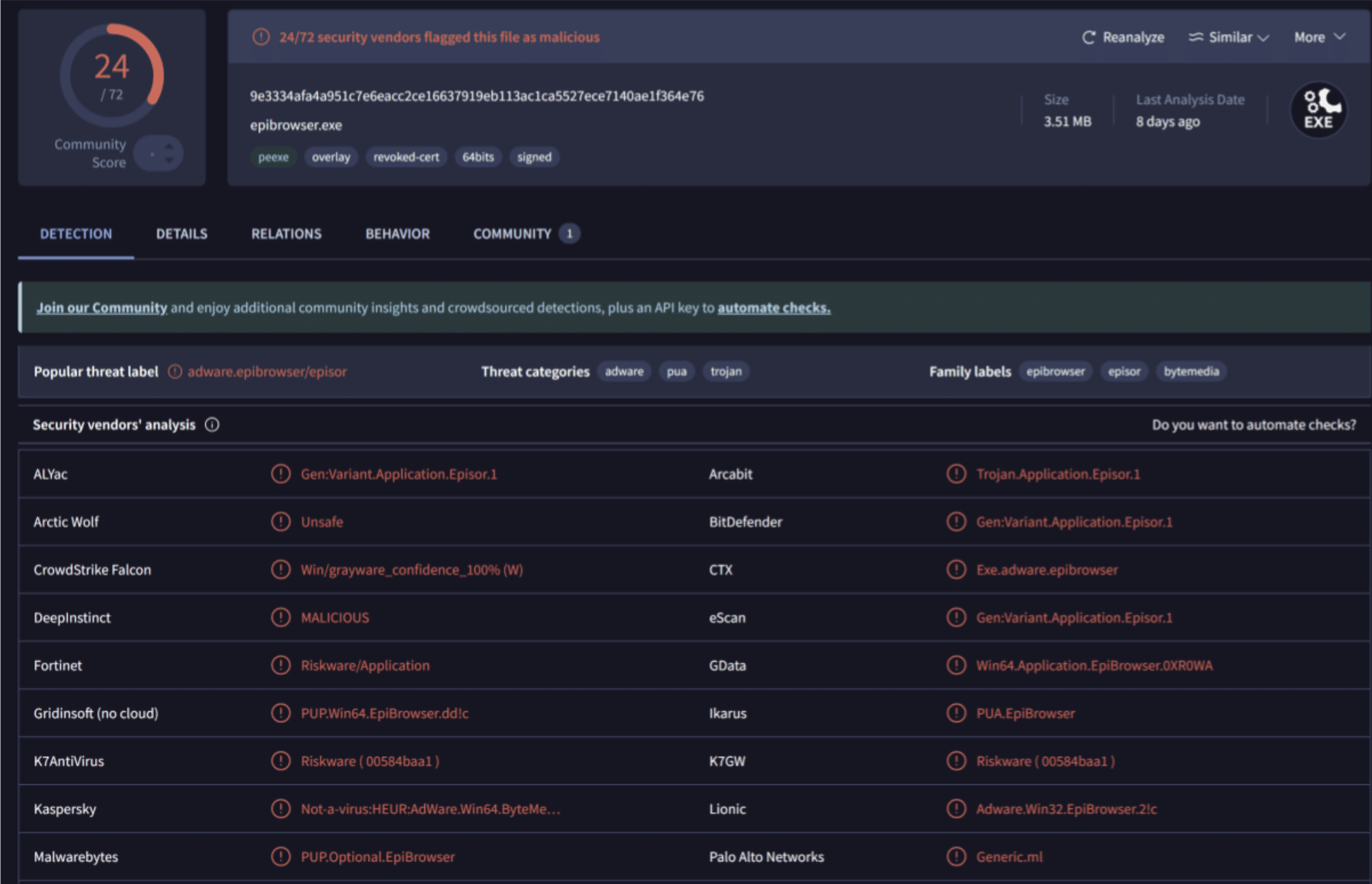
A pretty low detection rate, and earlier in August it was even lower. I’m not going to go into what settings would have helped here, but it bypassed multiple enterprise-grade tools in various state of configuration. A case for custom detection and being accountable for our own security there.
Again, just having the logs from the EDR tools and being able to write custom queries here is a boon. Correlation would help uncover attack paths and map out what actually happened. Detection and prevention is reliant on detecting it while it happens and that means detection has to be in place. What happens then, if we uncover a campaign and want to hunt? This is where the data lake and SIEMs come into play. XDRs historically have a pretty low data retention, the default being 30-60 days.
Data retention and the case for data lakes
By the nature of XDRs having low retention rates and usually lacking the ability to configure this, moving the data into a data lake or a SIEM was often the only option in many regulated industries. Having the ability to query the data quickly was usually something that was important for the first X days of the lifetime of logs, while having data that was easy to work with for a longer period had some use cases as well. For all intents and purposes, I will split these types of storage into three:
- Hot storage - instantly able to query
- Warm storage - can query, just a bit slower and with less features usually
- Cold storage - can be “rehydrated” on demand, or queried very slowly
In the Microsoft world, our options for doing this was:
| Type | Microsoft solution |
|---|---|
| Hot | Analytic logs |
| Warm | Basic/auxiliary logs Moving data to Azure Data Explorer |
| Cold | Archive tier Exporting data to Storage Account blobs |
The “easy” solutions of using archive for cold storage was obviously the most expensive one, and the API-coverage for managing all of this left something to be desired. At this point we can also add some words about how this is solved in other XDRs. Based on my knowledge, it’s usually one of three solutions that tools use to bill you for data:
- Purely based on data ingestion
- License and data ingestion
- License-only
An example of 2. is SentinelOne (which is an XDR/CSPM/Data Lake tool), where you can use the data lake capability with a simple EDR-license, and you can customize what data to collect. Storing data for longer or gathering more detailed data will incur extra cost based on quantity, however.
Without pinpointing the exact timeframe for this, there was a bit of a shift in the approach to logging (at least in my region) around this time. A lot of companies reached a point in their journey where the maturity was high enough that custom detection use cases using both SIEM and XDR logs AND historical data became a requirement.
The issue with this was simple; at this time it was usually quite complex to build and maintain cost-effective solutions for storing data outside of hot storage on the Microsoft-security stack, which in turn brought third-party options into the mix for a lot of companies.
Data engineering pipelines and third party solutions
Companies like Tenzir and Cribbl are some of the most known names in the field of data engineering pipelines. The concept is pretty simple; you can define data sources and data destinations (often referred to as sinks) and simply make a connection. Then you can apply filters (most common data sources have community-created template filters) and send parts of the data to the hot storage, parts of it to cold storage:
graph LR;
    A[Source];
    B[Filter];
    S[Sink];
    S1[Sink 2];
    A-->B;
    B-->|Hot storage|S;
    B-->|Cold storage|S1;
The cost model here was also refreshing - Cribbl Stream had a simple volume-based license that gave you all features (not sponsored by the way). This came with the ability to rehydrate data from a cold storage sink (like blob storage) straight into hot storage (like Microsoft Sentinel) for “free”. You’d still have to pay Sentinel ingestion price. You could deploy Cribbl Stream collectors to serve as syslog-servers and simplify your data filtering quite a lot. The user interface was (and still is) leagues above custom data collection rules in the Microsoft-stack. So what’s the drawback here?

Well, it’s managability. It’s another tool to learn and people needed to manage it. It also has it’s own costs that adds up on top of what you already have. For many, the added cost didn’t outweigh the work you had to put in to manage data, or they simply didn’t care enough to keep data outside of the 90 days allowance in Sentinel or 30 days in Defender XDR.
All right, get to the point.
I think the reason why vendors are merging XDR/SIEM/Data Lake tools into a “single pane of glass” is quite obvious. The era of cloud-based, easy-to-use tooling means that we (should) have an easier job and hopefully more time overhead to create custom detections adapted to our own company. This in turn raises the requirements for data and correlation options. I’m not going to touch on the whole data science thing, but that also is a driver for sure.
Customers need cost-effective solutions that are easy to use. If a solution is clunky (i.e Sentinel hot/warm/cold storage) or costs too much (many XDR tools streaming logs to a SIEM-like solution) then customers had to look to other tools, custom solutions and the likes.
Enter unified experience
So we get the unified experience, which is our first taste of Sentinel+Defender XDR. It’s a way to connect Microsoft Sentinel to Defender XDR in the security.microsoft.com portal. One of the big boons of this merger was the ability to query across Sentinel- and XDR-tables using custom detection rules.
Even if the XDR-tables only had a limited lifetime of 30 days, this was still a big upgrade for detection engineers living in companies that had limited budgets as they could now, essentially free of charge, do the same thing that they previously had to stream data into Sentinel for.
Data Lake
A lot of XDR companies have introduced SIEM or Data Lake options into their stack in the last years, Microsoft was no exception. In 2025 they quickly introduced Data Lake in public preview and shortly thereafter it was in GA. While the unified experienced adressed the correlation and cost issue to certain degree, the data lake adresses the hot/warm/cold storage complexity that plagued Microsoft for a while, while also adressing ingestion costs to a certain degree.
With the data lake, you are able to either ingest data into the analytic tier (what I refer to as hot), which will then also duplicate the data into the data lake tier, or just straight into the data lake tier (what I refer to as warm). The data lake tier was previously called auxiliary tier, actually it still is pre-onboarding the data lake.
So at this point with unified experience (which is a requirement for the data lake) and the data lake onboarded, we have a good answer to the questions posed previously in this blog regarding cost of ingestion and storage, ease of use, correlation and the like. Microsoft at some point announced that the artist formerly known as Azure Sentinel would be moving out of Ibiza UI (Azure Portal) and be available only in the security.microsoft.com portal come July 2026. What does this mean for us?
On top of that, April 2026 introduced data federation and Defender-portal-native filtering/splitting. This is a pretty big deal for migration planning since we now have a cleaner path to keep high-signal data in analytics tier while routing lower-signal data to lake tier without building custom data pipelines for everything.
A quick side story - the curious case of a Cloud Native SIEM
A quick word on Azure Sentinel and why it was so good. Moving from other “cloud-first” or “cloud-native” tools, or even traditional on-prem SIEMs to Microsoft Sentinel was like tasting food for the first time. A colleague once said about the data ingestion being so simple;
“It can’t be this simple?”
He came from Splunk, which should not be a dig against Splunk - we used both because we had different use cases for both.
I won’t go into detail about all things Sentinel here, but the fact that it had full API-support to deploy and control all features that was released and it had full CI/CD capability with ARM/Bicep support since it was built in/on/with Azure-components.
Still today, even Microsoft Defender XDR is lacking a lot in the API department, but that is not just limited to Microsoft. A lot of XDR, SIEM and Data Lake tools to this day still lacks the functionality and API-coverage that made Azure Sentinel such a beast. This will still be present for the time being since all Azure APIs will continue to work, but the track-record of API coverage in M365/Defender XDR is a lot less stellar than for Sentinel. Hopefully this is something that approves once the transition is complete.
Migrating to Defender XDR
There’s a couple of things that will happen going forward. Obviously the unified experience will be enforced July 2026 and you will no longer be able to reach the UI of Sentinel in the Azure Portal. All APIs will remain as-is with support for some years, but expect (this is a pure guesstimate on my end) that a lot of APIs will move to Microsoft Graph.
Also worth noting now: the SIEM migration experience is GA, which gives a more practical in-product path for planning Splunk/QRadar migration scope and connector mapping. For correlation design, keep a close eye on current Defender correlation behavior, especially around primary vs secondary workspace behavior.
If you are curious about something like the new upload indicator v2 API being pushed and the graph tiIndicator resource type being deprecated when everything else might be moving from Azure APIs to Graph, don’t ask me. I don’t know why it’s like this, but I think the idea is to move to Graph.
Some of the APIs for features like Custom Detection Rules (CDR) are still in preview, but we expect (again guesstimate from me) that components with overlap such as Analytic Rules and CDR will be merged into a single component at some point. Same with Summary Rules and KQL Jobs. Might not happen at all, might happen, who knows.
Fusion is “dead”
One big thing that happens is that the Microsoft Sentinel Fusion engine, the correlation engine in Microsoft Sentinel, will be disabled when enabling the unified experience.
Fusion had a lot of configuration options in regards to correlation, where as the new engine in Defender does not. Or, well, it does have some after heavy community feedback. Kudos to Microsoft for adding the ability to exclude analytic rules from correlation in Defender XDR.
One of the biggest painpoints we identified was that across 100s of orgs we saw a lot of different usage of alerts and incidents implemented as different kinds of detections, from detecting configuration changes and anomalies all the way up to atomic detections. This would be quite a big job for a lot of customers to change all those detections (who were not intended to be correlated at all) before July 2026.
So what can we do currently to prepare?
I think the most important things is to plan ahead. Enable unified experience at your earliest convenience and set aside some time to explore how this impacts you. There will be changes to what content is available (i.e analytic rules and CDR) going forward, so that is something you’ll need to plan for both in terms of your CI/CD implementations but also migrating from one to the other. According to this feature comparison between analytic rules and CDR CDR is now the way to go:
“Custom detections is now the best way to create new rules across Microsoft Sentinel SIEM Microsoft Defender XDR. With custom detections, you can reduce ingestion costs, get unlimited real-time detections, and benefit from seamless integration with Defender XDR data, functions, and remediation actions with automatic entity mapping.”
If you are onboarding to Microsoft Sentinel after July 2025 you will be automatically onboarded and redirected to the Defender portal.
Save that money
The data lake is a great opportunity to both get a more comprehensive data coverage and cut costs. The architecure of the the data lake allows you to send data straight into the lake itself without spending costly money on the hot ingestion into analytic tier:

We can separate this data on primary and secondary security data, which allows you to make informed decisions about what data to send into Sentinel and what to send into the Sentinel Data Lake:
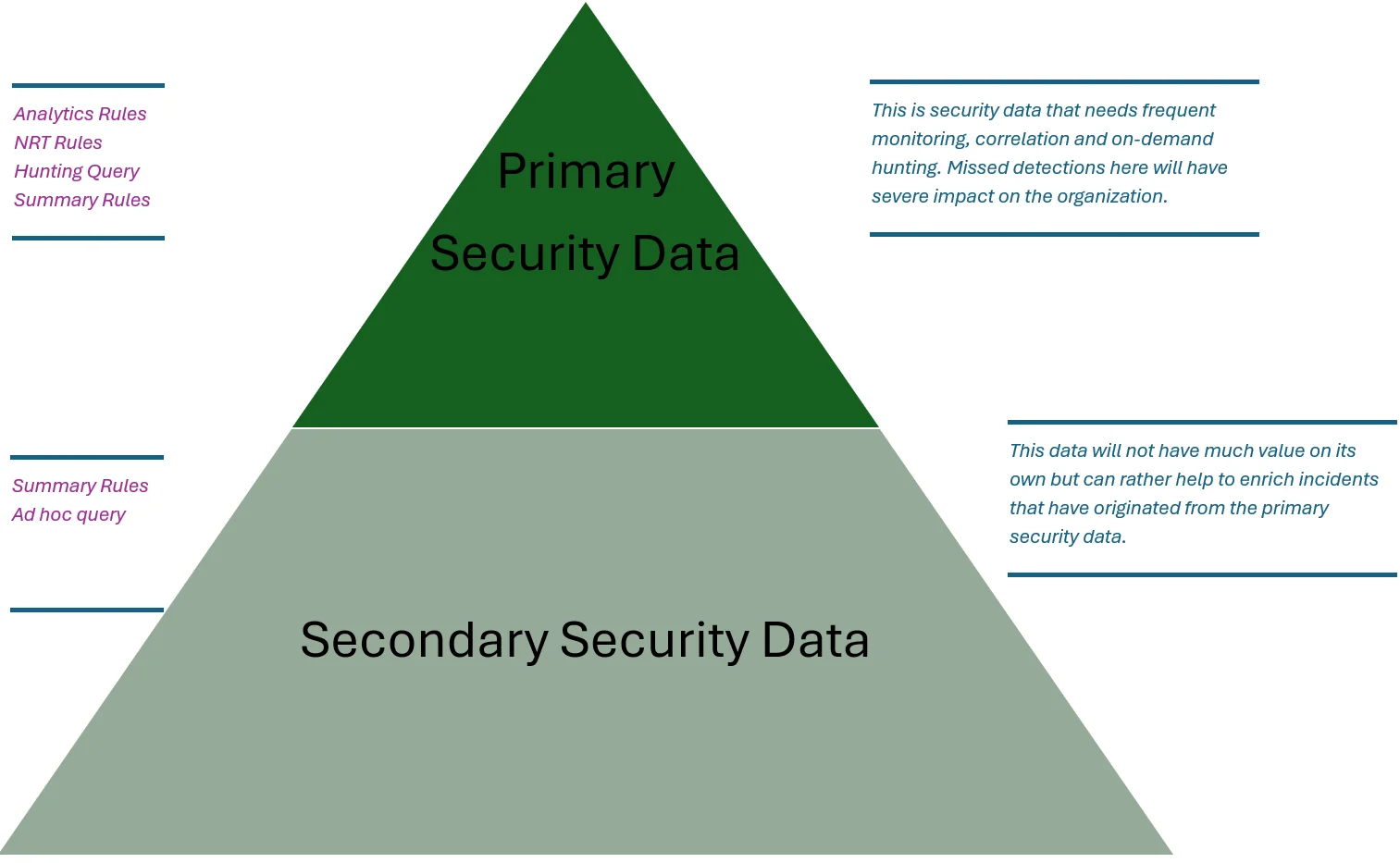
To dig more into this I recommend reading this blog, but we can use whatever ingestion mechanism we want (this can be Azure Monitoring Agent and Data Collection Rules, but doesn’t have to be) to ingest data into whatever tier we want, then if we need data from the lower data lake tier we can use summary rules or KQL jobs to move that data back into the hot (analytic tier) as we want:
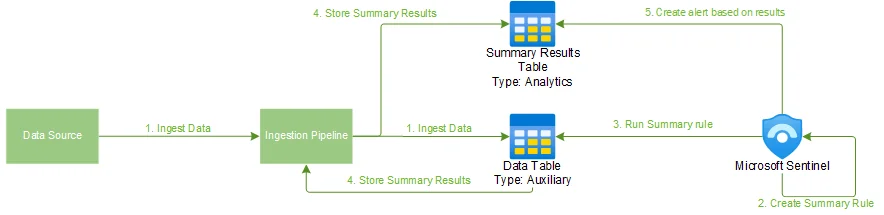
With the new unified experience and data lake we can control the data tier directly through the console. No API support (yet), but we can dream.

Prepare for Microsoft Sentinel Graph
Microsoft Sentinel Graph is a:
”… unified graph analytics capability within Microsoft Sentinel that powers graph-based experiences across security, compliance, identity, and the Microsoft Security ecosystem - empowering security teams to model, analyze, and visualize complex relationships across their digital estate.”
It includes some cool capabilities:
- Features such as Attack Path within Microsoft Security Exposure Management (MSEM) and Microsoft Defender for Cloud (MDC) provide recommendations to proactively manage attack surfaces, protect critical assets, and explore and mitigate exposure risk.
- [New] Blast radius analysis in Incident graph in Defender helps you evaluate and visualize the vulnerable paths an attacker could take from a compromise entity to a critical asset.
- [New] Graph-based hunting in Defender helps you visually traverse the complex web of relationships between users, devices, and other entities to reveal privileged access paths to critical assets to prioritize incidents and response efforts.
- [New] Activity analysis via Microsoft Purview Insider Risk Management supports user risk assessment and helps you identify data leak blast radius of risky user activity across SharePoint and OneDrive.
- [New] Microsoft Purview Data Security Investigations graphs facilitate understanding of breach scope by pointing sensitive data access and movement, map potential exfiltration paths, and visualize the users and activities linked to risky files, all in one view.
Also, there is some AI involved here.
Model Context Protocol in Sentinel and Defender
You can read more about using the Microsoft Sentinel Data Lake and Microsoft Sentinel Graph MCP in an older blog post I wrote about creating detection engineering agents. A quick TL;DR on MCP:
An apt example of this is that it allows a chat AI interface, or your agent in your IDE (like VSCode) to interact via the MCP with other systems such as directly querying your notion docs or updating your calendar.
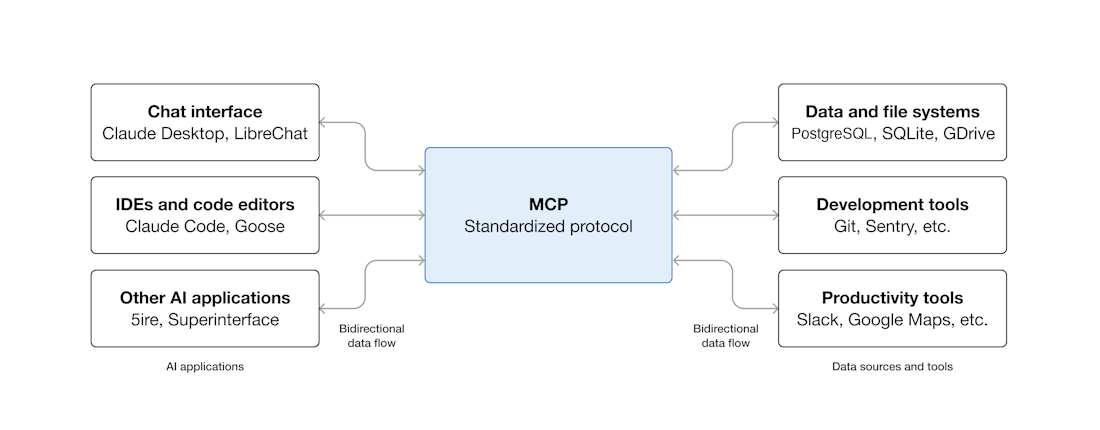
An apt security example is the Microsoft Sentinel MCP server which allows us to do query data in the Microsoft Sentinel Data Lake and the Microsoft Sentinel Graph.
Again, if you want to set it up in VSCode and start exploring, head over to my blog post.
Access patterns for providers
Won’t spend too long on this, but migrating Sentinel will cause some issues with Azure Lighthouse access. The only method that currently is fully supported is using b2b via Identity Governance Access Packages which might increase license costs for customers with MSP/MSSPs.
Full GDAP support is being worked on, but Azure Lighthouse does not support Entra roles and will thus not work as a full solution for for the security.microsoft.com portal as it’s part of M365 and relies on Entra/M365 roles.
It’s important for service providers and customers to review what access patterns are currently in use and what needs to change in order to have a fully functioning solution come July 2026.
Last words
There’s a lot more to the Sentinel into Defender migration and more information will become public as we move into the year. The important thing to be aware of is that the cutoff is forced in July 2026, but the components will remain in Azure and that the Azure APIs will continue to work until they get feature parity in Defender (and probably a bit longer than that also).
There are loads of technical tidbits that you will need to care of, but the large overarching things to note down are:
- Enable Unified Experience before July 2026
- Make sure to exclude any analytic rules from correlation if needed
- Start creating custom detection rules instead of analytic rules
- Add support for CDR to your CI/CD setup (even if the API still is a bit buggy it’s good to start experimenting)
- Enable Data Lake
- Take ownership of your data, sort it into primary and secondary data
- Save money by moving verbose secondary data directly into data lake tier
- Explore summary rules and KQL jobs if you have relevant use cases
- MCP-tooling
- Not really a big fan of all the AI-hype personally, but give it a try. See if it makes sense for you.
- Follow the news
- There’s still a lot of unknowns related to this migration, so it doesn’t hurt to follow news
- Specifically, changes to APIs (transition, deprecation, new APIs) and changes to content pieces such as analytic rules and CDR.
I recommend following new posts on the Microsoft Sentinel blog to keep up to date on news.